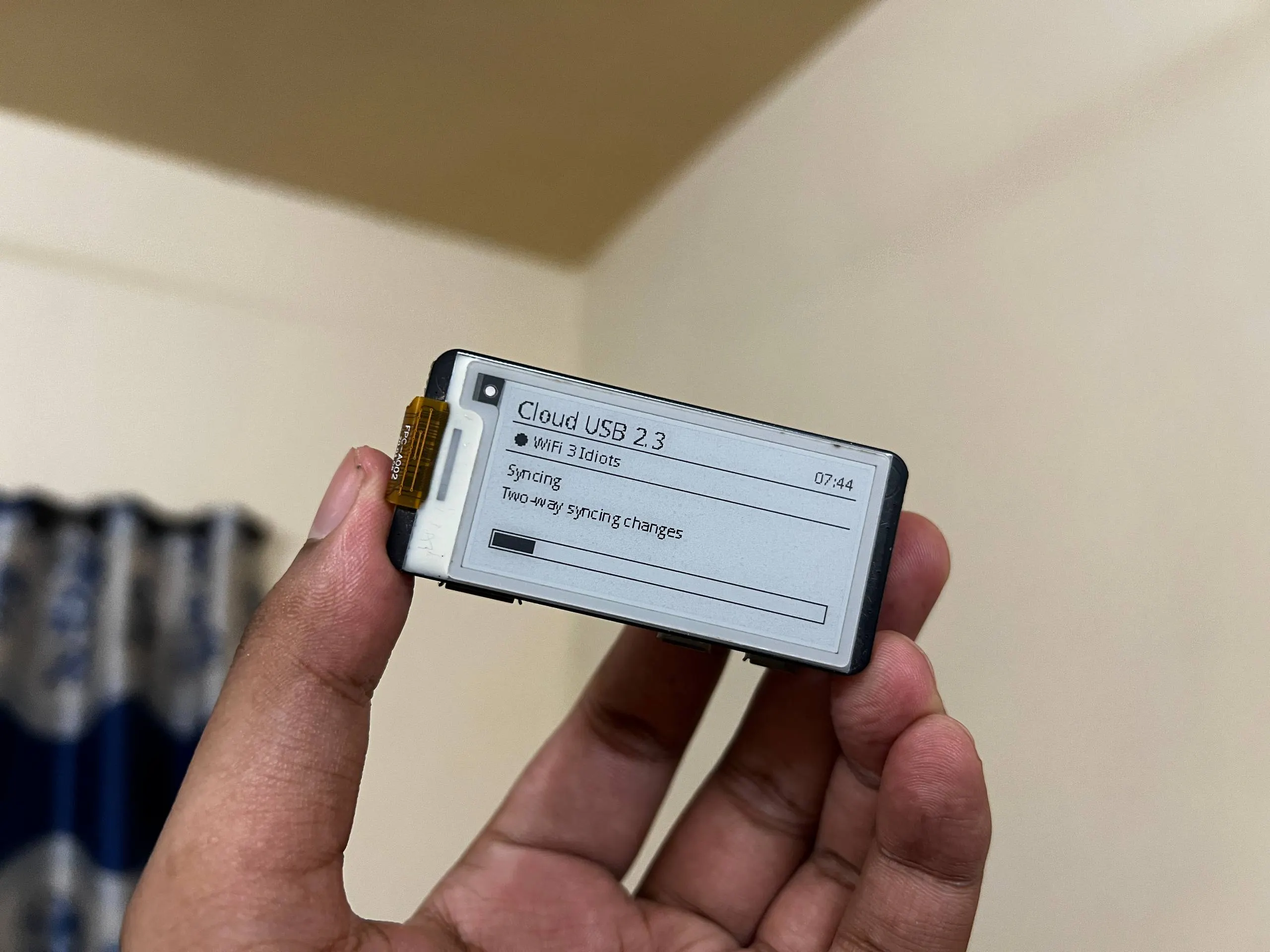
☁️ Cloud-Synced Smart USB Drive
May 2026 Saturday
☁️ This is where Portable Storage Meets Intelligent Cloud Sync
Turning a Raspberry Pi into an intelligent USB flash drive that automatically synchronizes files with cloud storage while providing real-time status updates on an e-paper display.
🚀 What This System Delivers
✅ Automatically syncs files between a USB drive and cloud storage
✅ Appears as a regular USB flash drive when connected to a computer
✅ Secure two-way synchronization with conflict prevention
✅ Built-in Wi-Fi configuration directly from the USB drive
✅ Live progress and system status displayed on a Waveshare E-Paper screen
✅ Automatic filesystem repair after unexpected shutdowns
✅ Multi-device synchronization protection to prevent data conflicts
✅ Reliable recovery and persistent state management after reboot
✅ Fully automated background operation with minimal user interaction
🛠️ Technologies Used
- 🍓 Raspberry Pi
- 🐍 Python
- 🐧 Embedded Linux
- ☁️ Rclone
- 💾 USB Gadget Mode
- 📡 NetworkManager (nmcli)
- 📂 FAT Filesystem
- 📄 JSON / JSONC
- 📺 Waveshare E-Paper Display
⭐ Project Highlights
🔹 Designed and developed a complete embedded storage appliance instead of a simple synchronization script.
🔹 Combined Raspberry Pi hardware, Embedded Linux, cloud storage, and USB Mass Storage into a seamless plug-and-play solution.
🔹 Built a fault-tolerant synchronization system with self healing and data protection mechanisms.
🔹 Optimized for real-world deployment where reliability, ease of use, and data integrity are essential.
💡 Skills Demonstrated
- 🖥️ Embedded Systems
- 🍓 Raspberry Pi Development
- 🐍 Python Programming
- 🐧 Linux System Programming
- ☁️ Cloud Synchronization
- 📡 IoT & Edge Computing
- 💾 USB Mass Storage Development
- 🔄 Automation & System Integration
💡 Fun Fact
📟 One of the highlights of this project was developing for the Waveshare 2.13" e-Paper HAT+. Since e-paper only uses power when the display changes, it's incredibly energy efficient, making it ideal for always-on embedded devices. I really enjoyed learning how to integrate and optimize this display with the Raspberry Pi Zero 2 W, and it sparked my interest in low-power embedded system design.